I have been working in video for several years now, and one question keeps coming back, whatever the team or the catalogue: how do you build the right ladder?
Which resolutions? Which bitrates? How many rungs? And above all: how can you be sure you are not wasting bandwidth on easy content, or sacrificing quality on hard content?
Today I am releasing qc, an open-source tool (MIT licence) that answers these questions with measurements rather than rules of thumb.
The problem
Most ladders are still static: the same table of resolutions and bitrates for every title. But a cartoon and a football match do not compress the same way at all. The first reaches excellent quality at a fraction of the bitrate; the second needs far more bits for the same perceived quality.
Per-title encoding solves this in theory. In practice, finding the optimal ladder of a title means encoding it many times at many resolutions and measuring each encode. On a 10-minute title, an exhaustive search takes about two hours. Most teams cannot afford that for every piece of content, so they fall back to a generic ladder.
I wanted a tool that gets close to the optimum in minutes, on a laptop, and that proves its results instead of asking you to trust them.
How qc builds a ladder
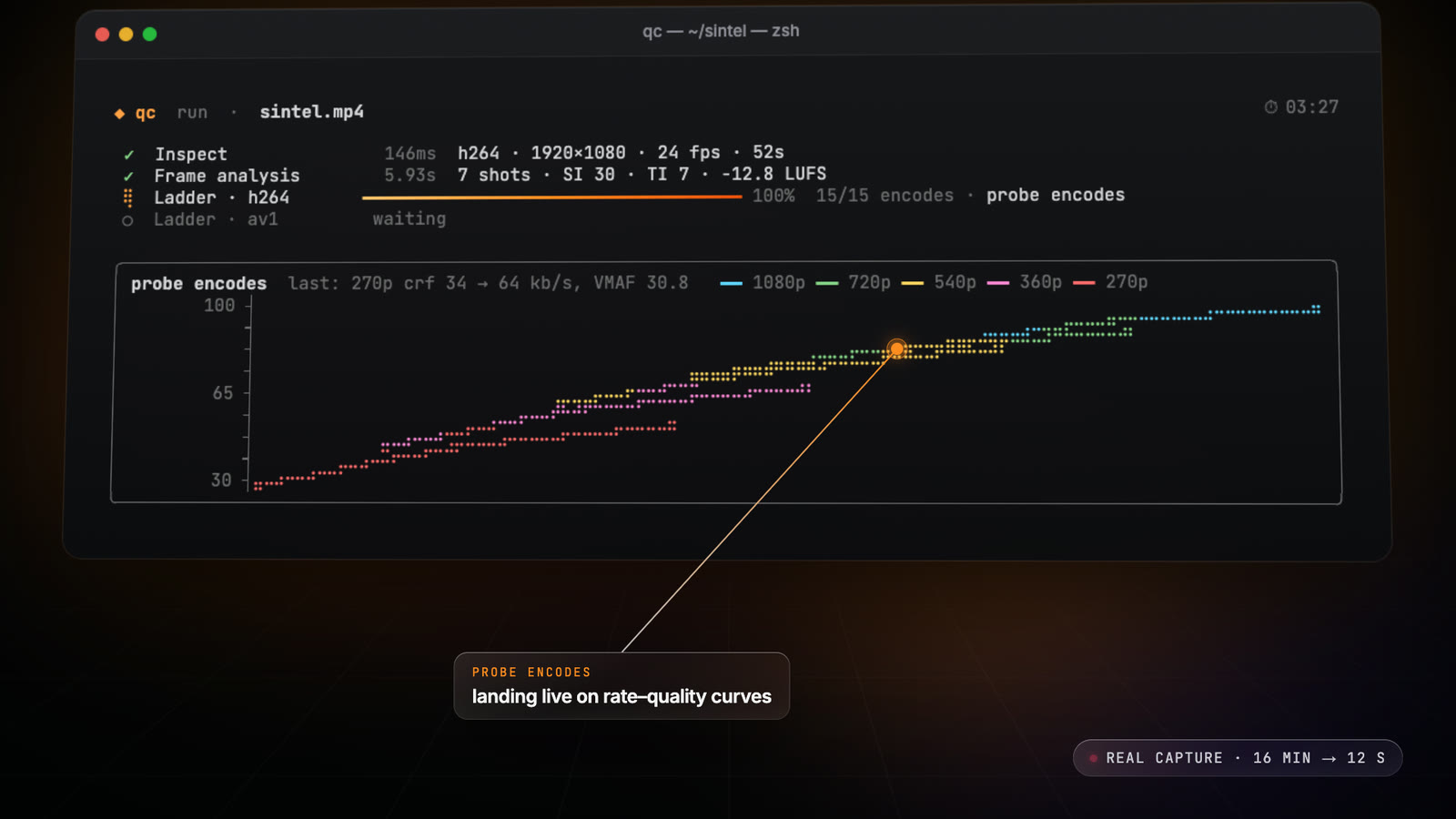
In one command (qc ladder source.mov -c av1), qc:
- Extracts a digest of the title: 20 segments of 2 seconds spread over the whole video, so every scene type is represented.
- Runs probe encodes of that digest at several resolutions and quality levels, and measures each one.
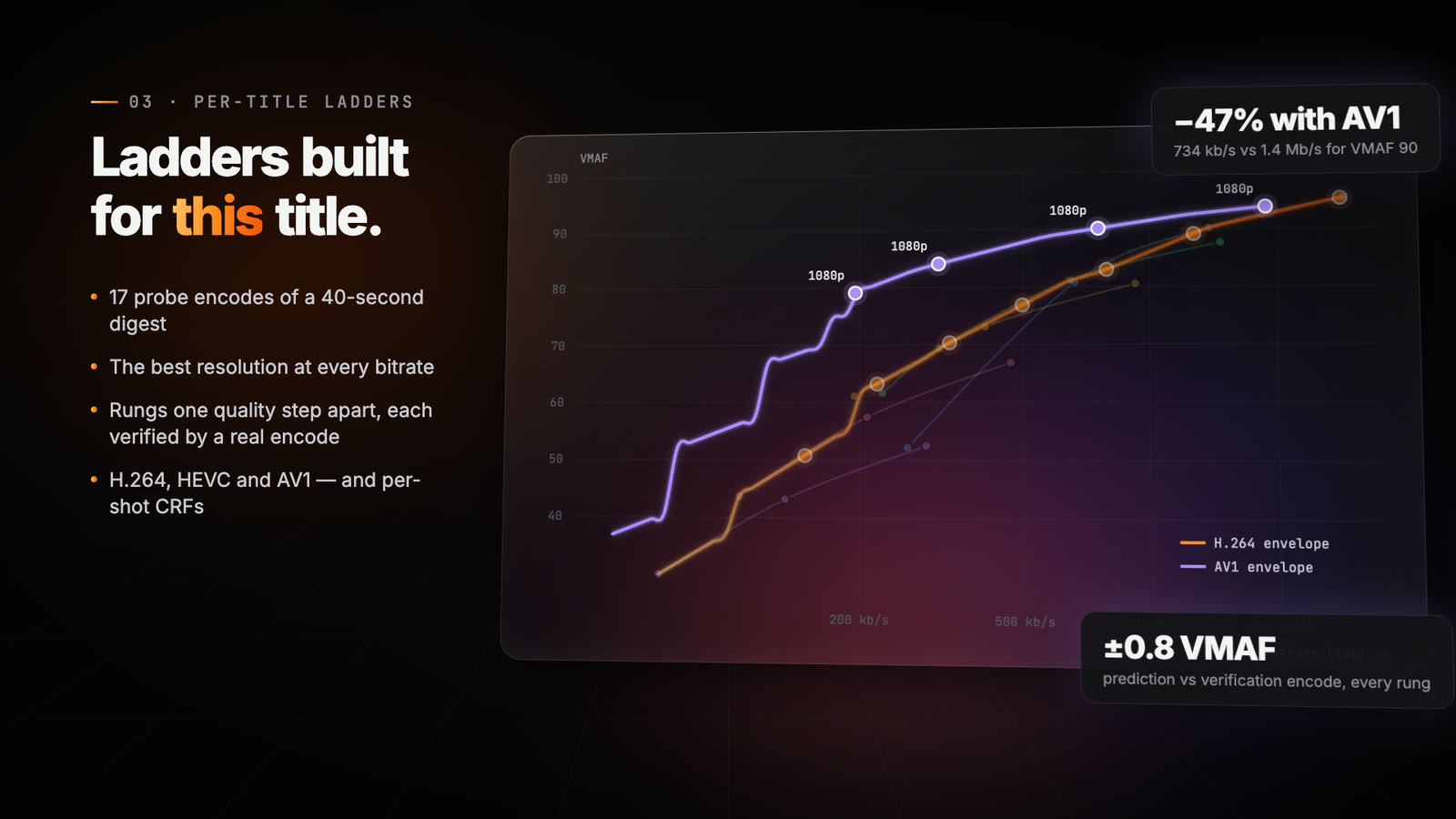
- Draws the rate-quality curve of each resolution, then keeps, at every bitrate, the resolution that gives the best quality: the envelope.
- Places the rungs on that envelope, one perceptible quality step apart, from VMAF 95 at the top down to the lowest useful quality. You can also impose your own shape (
--rungs 1080,720,540,360). - Verifies every rung with a real encode, and corrects it when the measurement drifts from the prediction.
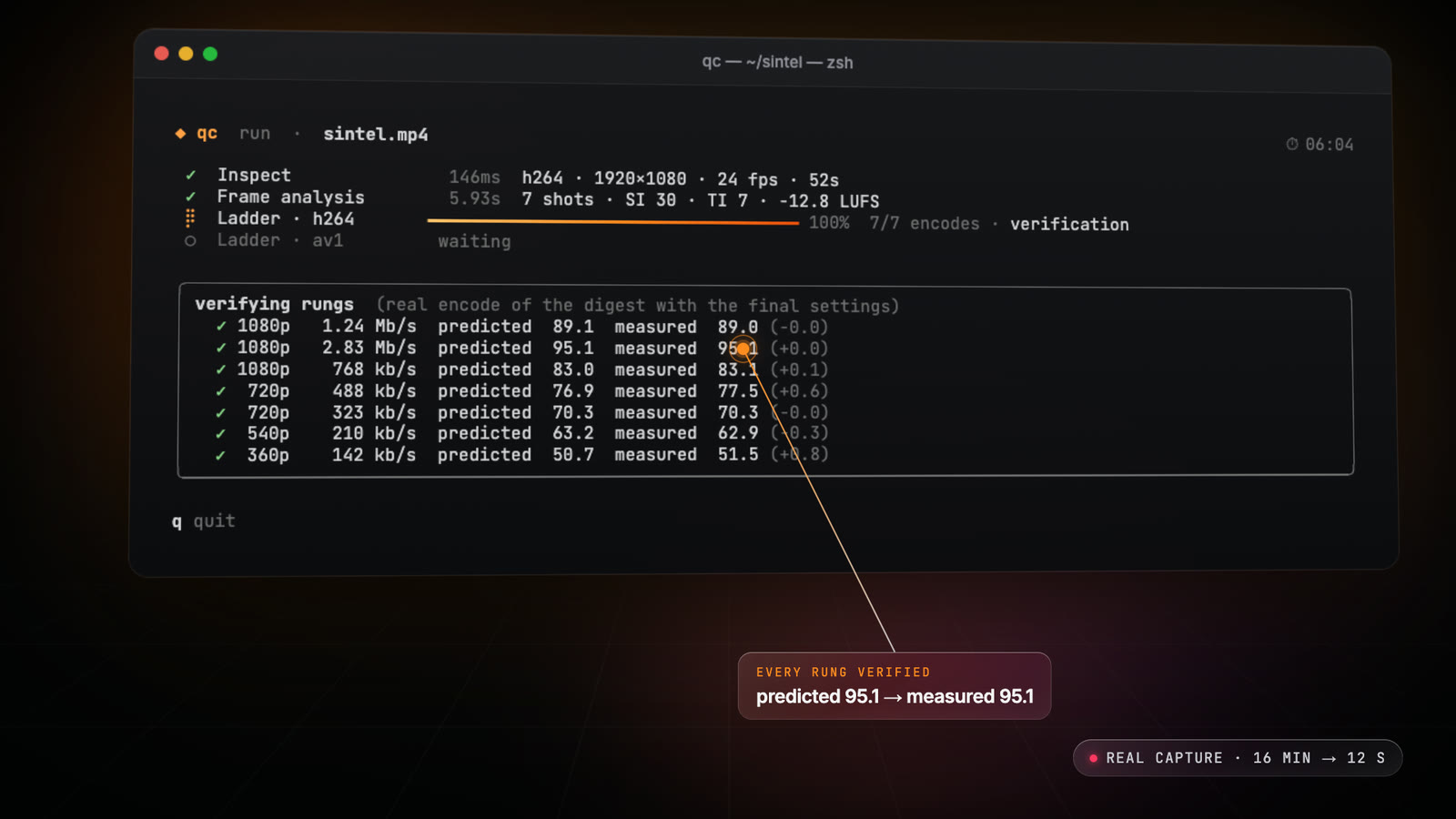
That last step is what matters most to me. On my tests, the predicted quality of each rung stays within 0.8 VMAF of the verification encode. You do not get a nice-looking table: you get a ladder where every line has been measured.
qc works with H.264, HEVC and AV1, and can compare codecs on the same title. On the Sintel trailer, for instance, the AV1 envelope reaches VMAF 90 with 47% less bitrate than H.264. That gain depends heavily on the content, which is exactly why it is worth measuring title by title.
Two more things I care about:
- Per-shot ladders (
--per-shot): qc gives each shot its own CRF at an equal rate-quality slope, for the same overall quality. Depending on the content, this saves more or less bitrate, and qc tells you how much on your title rather than promising a fixed figure. - Renditions (
--encode-ladder renditions/): once the ladder is built, qc encodes it on the whole title and checks every rendition against the source, so what you ship matches what was planned.
VMAF you can trust, in seconds
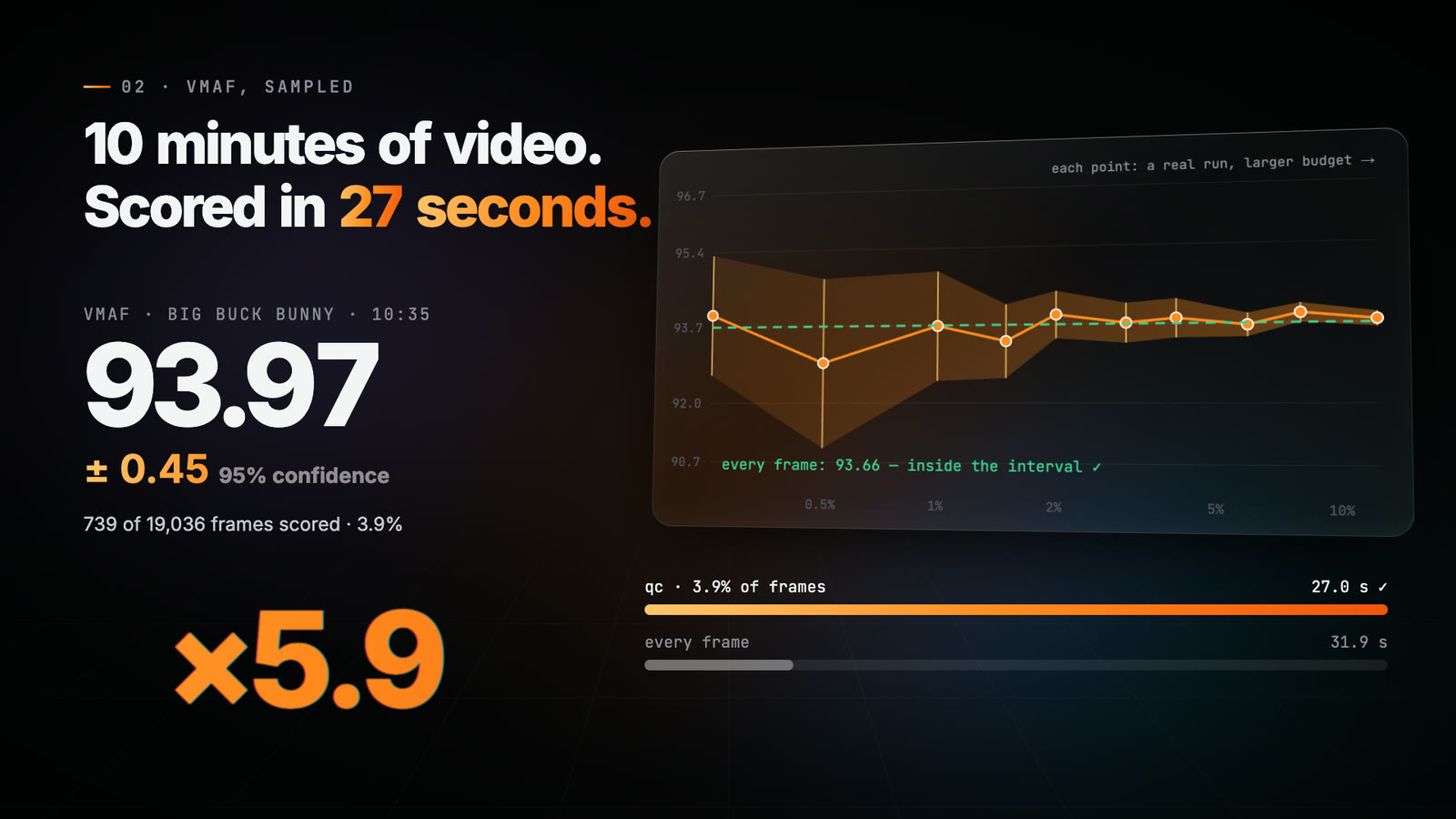
Measuring quality is the other half of the problem. Scoring VMAF on every frame of a long title is slow; sampling is fast, but how far can you trust the number?
qc samples the frames that matter and always reports a 95% confidence interval. On a 10-minute film, it gives 93.97 ± 0.45 in 27 seconds, where scoring every single frame takes 160 seconds and lands at 93.66, right inside the interval.
Next to VMAF, qc measures XPSNR, PSNR, CAMBI (banding), SSIM and more on the same frames, each with its own interval.
Everything around it
A ladder is only as good as the source it is built from, so qc also runs the technical QC of a file in a single decode:
- Video: bitrate over time, GOP structure, scene cuts, spatial and temporal complexity (SI/TI), black and frozen frames, letterboxing, luma levels;
- Audio: EBU R128 and ATSC loudness, true peak, silence, clipping, phase;
- HDR: HDR10, HLG, MaxCLL/MaxFALL, and HDR-aware metrics;
- NVIDIA GPUs: NVDEC decoding, NVENC ladders and CUDA VMAF.
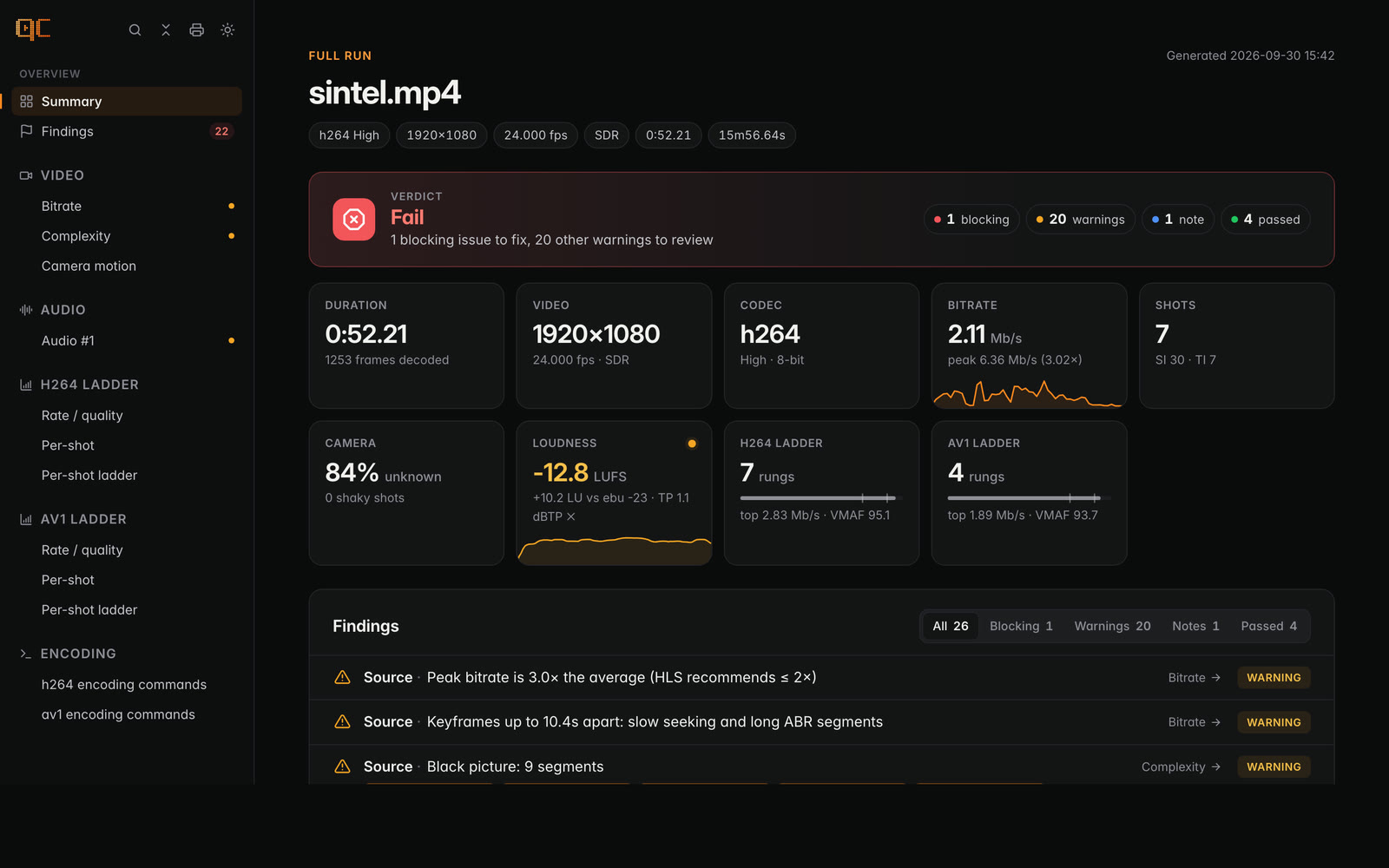
Everything ends up in a self-contained HTML report, one file that works offline, with a verdict, findings and zoomable charts, that you can share with your whole team. There is also a JSON report for pipelines.
Try it
qc is a single binary written in Go. Pick what suits you:
# Homebrew (macOS, Linux)
brew install eko/tap/qc

# Docker
docker run --rm -v "$PWD:/data" ghcr.io/eko/qc run source.mov --codecs h264,av1 --html report.html
Every release also has self-contained binaries for Linux (amd64, arm64) and macOS (Apple silicon): only ffmpeg is needed.
A few commands to start with:
qc                                             # an interactive wizard
qc vmaf reference.mov encode.mp4               # VMAF with its confidence interval
qc ladder source.mov -c av1 --per-shot         # a per-shot AV1 ladder
qc run source.mov --codecs h264,av1 --html report.html   # everything, one report
qc is also a Go library: every stage (analysis, VMAF, ladders) is a package you can call from your own services.
What is next
The next step I am thinking about is the ladder of a whole programme or season: finding the hardest scenes across a set of files and building one shared ladder that holds its quality on (almost) every episode.
This project brings together a lot of what I have learned over the years. If you work in encoding or streaming, I would love to hear what you think: try it on your next title, open an issue, or star the repository if you find it useful.